Dual Camera Sides
- 3.0
- Rating
- 500.00K
- Installs
- Free
- Price

 Analysis by App-foxy
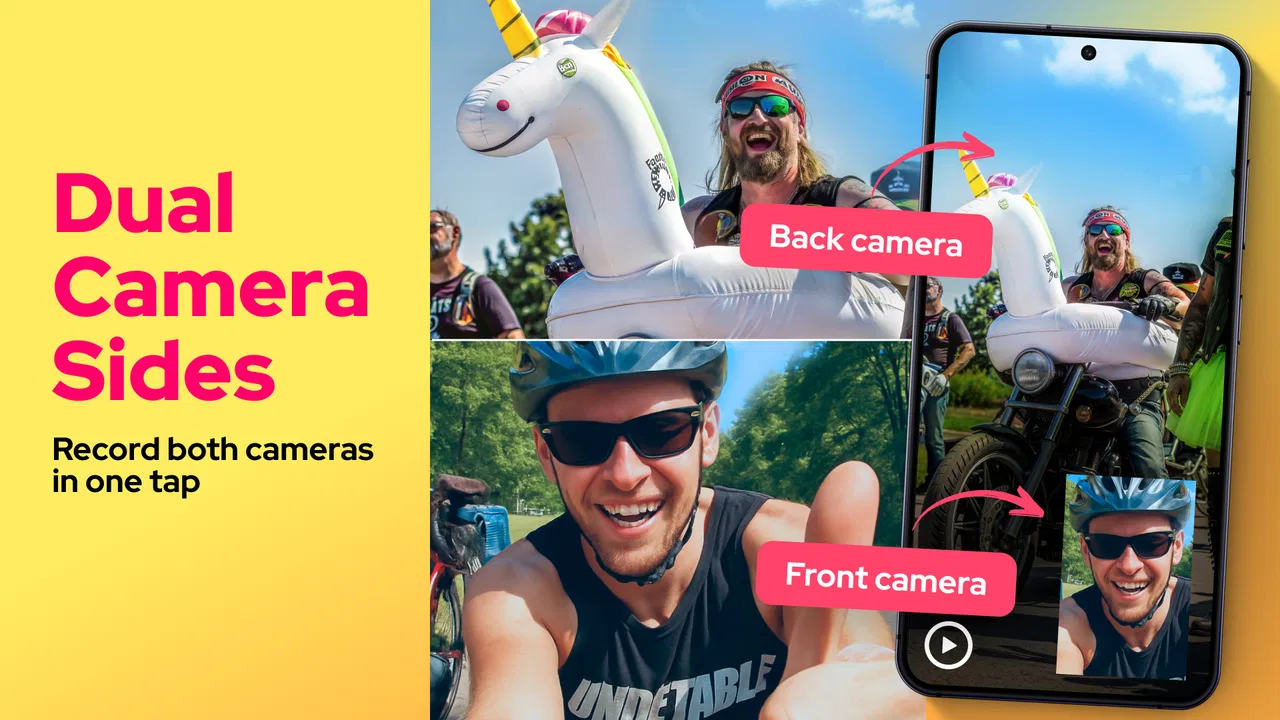
I tried Dual Camera Sides as a focused camera utility rather than as a full replacement for a phone’s built-in camera. Its central idea is simple: record video with the front and rear cameras together. That makes it useful for moments where your reaction matters as much as what is happening in front of you, although the experience depends heavily on how steady and predictable your phone’s camera controls are.
The app comes from One Music Player and sits in the Libraries & Demo section of Android’s app catalog. It is free to install, suitable for Everyone, and works on devices running Android 7.0 or later. The current release is version 8.1.0, and the app has passed over 500 thousand installs. Its average rating is 3.0 from around 5 thousand ratings, which tells me that interest is real but the experience is not equally smooth for every user.
How the current version fits into everyday recording
The most obvious use is a two-perspective video. I can point the rear camera toward a concert, a street performance, a family activity, or a scenic view while keeping a small view of myself through the front camera. That is more useful than it first sounds. A normal rear-camera recording preserves the event, but it often loses the person filming. A front-camera recording captures the reaction but sacrifices the surroundings. A dual-camera layout tries to keep both.
You May Also Like

 Blood Strike: 2.5 Anniversary
Blood Strike’s Loadouts Turn Every Drop Into a Tactical Gamble
A close look at Blood Strike’s custom loadouts: how fast access to signature weapons reshapes its battle royale rhythm, rewards preparation, and narrows the gap between fights.

 Pandora - Music & Podcasts
Pandora’s Music Is Easy to Start, but Harder to Recover
Pandora’s strength is its low-effort path from a seed to a station. Its weak spot is how much confidence it asks you to place in connection, setup, and quiet recovery.

 8 Ball Pool
 Is Built on Rivalries, Rematches, and Routine
A close look at the rivalries, rematches, shared routines, and unanswered safety questions that turn a quick pool match into a persistent mobile community.

 Samsung Music
’s Quiet Strength Is Playing What You Already Own
Its reach comes less from spectacle than from dependable access to a personal library. That simplicity is both the app’s strongest retention engine and its ceiling.

 AccuWeather: Weather Radar
AccuWeather Review: A Quick, Clear Forecast for Everyday Decisions
For everyday plans, the best forecast is the one you can understand quickly. AccuWeather makes rain timing, radar, and local conditions easy to act on, with a few trade-offs.

 Hill Climb Racing
Why Hill Climb Racing Still Turns Crashes Into One More Run
A tiny car, a bumpy hill and one more upgrade: Hill Climb Racing keeps resurfacing because its simple chaos makes every near-miss feel personal.
More From Our News Desk



I would particularly recommend it for short personal clips rather than carefully produced films. A parent could record a child’s first attempt at something while keeping their own reaction in the frame. A traveler could show a landmark and their immediate response without switching between cameras. Someone testing a product, demonstrating a hobby, or explaining a location could also benefit from showing both the subject and the person speaking.
The practical strength is the reduced need to repeat a moment. With ordinary camera apps, changing from the rear lens to the front lens interrupts the recording and can make a spontaneous scene feel staged. A dual-camera approach is better when the point is continuity. I found that the feature makes the most sense when the emotional response is part of the story, not when I only need the cleanest possible view of an object.
That distinction matters because this is not automatically the best camera for every situation. If I am recording a landscape, a document, a sports event, or anything where image quality and framing are more important than my presence, the phone’s standard camera may be the better choice. Its controls are usually more familiar, and the manufacturer’s camera application is often more deeply integrated with the device.
A realistic way to use it
Imagine attending a small school performance. I could place the rear camera toward the stage and keep the front-camera window on my face. Before recording, I would choose a position that keeps the phone stable, check that neither view is blocked, and avoid standing where the screen brightness or my own movement becomes distracting. The result would not just show what happened; it would also preserve how I experienced it.
For that kind of situation, I would keep the clip short and review it immediately. Dual views create more visual information, but they also make mistakes more noticeable. A tilted phone, a finger near one lens, or an unflattering front-camera angle affects the whole recording. A quick check before sharing is more valuable here than repeatedly changing settings after the event.
Another useful workflow is recording a demonstration. I can place the rear view over a desk, instrument, craft project, or piece of equipment while the front view shows my face as I explain the steps. This can feel more natural than filming the object first and adding narration later. It also helps viewers connect the instructions with the person giving them.
There is a trade-off, though: two camera views compete for attention. If both scenes contain important details, the viewer may not know where to look. I would use the secondary view for context or reaction and let the main view carry the essential action. That simple choice makes the finished clip easier to understand.
What version 8.1.0 means for existing users
Version 8.1.0 is the release I would judge today, rather than relying on impressions from an older build. The app has been available since March 1, 2023, so it is not a brand-new experiment. Its continued presence and install base suggest that the dual-camera concept has found an audience, even though the middling average rating points to a need for realistic expectations.
For someone already using an earlier release, the sensible approach is to update and then test the exact recording workflow they depend on. I would not assume that a version number alone guarantees identical behavior across every phone. Camera hardware, Android implementation, and manufacturer restrictions can all influence what a third-party camera utility can do. The important question is not simply whether the app opens, but whether both views record reliably on the specific device.
I also think current users should keep original recordings until they are satisfied with the updated behavior. That is ordinary caution when a camera tool is part of a personal archive or an important event. A short test clip can reveal whether the front and rear views appear as expected, whether the audio matches the video, and whether the saved file behaves properly in the gallery. I would do this before using it for something that cannot be repeated.
The developer is One Music Player, and the app’s current presentation remains focused on the dual-camera task rather than trying to become a complete editing suite. That focus is helpful. I would rather have a straightforward capture tool than one overloaded with unrelated controls. At the same time, the limited scope means I would expect to use another application afterward if I needed trimming, captions, transitions, color correction, or detailed sound work.
Where the experience can become frustrating
The first source of friction is composition. A front-camera window can cover part of the main scene, and the ideal position changes depending on whether I am filming vertically or horizontally. I would decide the viewing format before pressing record, because changing orientation halfway through is rarely a good rescue plan. For social clips, vertical framing may feel natural; for scenery, demonstrations, or group activities, horizontal framing may give the main view more breathing room.
The second issue is stability. Holding a phone at arm’s length while trying to keep two views meaningful is harder than recording with one camera. A small tripod, stand, or secure surface can make a bigger difference than another setting. If the phone moves constantly, the audience may find the dual layout tiring even when both cameras are working correctly.
Lighting also deserves attention. The front and rear cameras do not necessarily face the same lighting conditions. I might be well lit while the background is dark, or the scene behind me may be bright enough to make my face look shadowed. I would position myself with the strongest light in front of me rather than behind me, then check the rear view for glare and distracting reflections.
Sound is another reason to test before an important recording. A dual-camera app is mainly judged by its visual idea, but viewers still notice muffled speech, wind, and background noise. If I am explaining something, I would stand close enough for clear speech and avoid assuming that the camera arrangement will solve an audio problem. For a polished interview or presentation, a dedicated microphone and a more advanced recording setup may be a better investment.
There is also a privacy consideration in everyday use. Because the rear camera can capture the surrounding environment while the front camera shows the person holding the phone, it is easy to include bystanders, private screens, house numbers, or conversations unintentionally. I would pause before sharing a clip and inspect both views, not just the main one. The small secondary frame can contain details that are easy to overlook.
How it compares with the usual alternatives
The built-in camera app is the obvious alternative. It normally wins when I want the most dependable access to the phone’s lenses, familiar exposure controls, portrait modes, stabilization, or manufacturer-specific processing. It is also the safer choice for a single subject where a second view adds clutter. If my priority is maximum image quality rather than simultaneous perspectives, I would start there.
A standard video editor is a different kind of alternative. It cannot recreate the spontaneity of recording both angles at once unless I capture them separately, but it gives me much more control over the final story. I can film a clean main shot, record a reaction later, and place the two clips together with precise timing. That approach takes more work, yet it is better when I need a polished result, consistent framing, or the ability to remove mistakes.
Video meeting and social applications may also offer front-and-rear camera layouts in particular modes, but those tools are usually designed around sharing, messaging, or live interaction. A dedicated dual-camera recorder makes more sense when I want to capture a file first and decide later how to use it. I would choose the social app for immediate publishing and this utility for a more deliberate recording workflow.
The compromise is convenience versus control. Dual Camera Sides is appealing because it addresses one specific problem directly: keeping the front and rear perspectives in one recording. It is less appealing if I want extensive manual control, professional monitoring, or a complete edit-and-share pipeline in one place. Knowing that boundary prevents disappointment.
Who should install it, and who should skip it
I would suggest trying it if you frequently record reactions, demonstrations, travel moments, personal commentary, or activities where the person behind the phone is part of the memory. It is especially interesting for users with older Android phones that do not offer a comparable dual-camera mode in the default camera. Since the app is free to install, experimenting with a short clip is relatively easy.
I would be more cautious if I mainly shoot still subjects, depend on professional-looking footage, or need guaranteed compatibility with specialized lenses and camera controls. The 3.0 average rating is a useful warning not to treat the app as universally polished. A person who records paid work, once-in-a-lifetime events, or carefully staged videos should test it thoroughly and keep a dependable backup method.
The age rating of Everyone makes it broadly approachable, but suitability is not the same as usefulness. A child may be able to understand the basic idea, yet an adult should still check what appears in the background before a recording is shared. For families, the app can be fun for reaction clips and creative projects, provided the phone is held securely and the final video is reviewed.
The app is free, although in-app purchases range from around one dollar to about one hundred dollars per item. That is important for anyone who wants to explore without unexpected spending. I would use the free experience first and decide whether the actual recording workflow justifies any optional purchase. I would not pay simply because the concept sounds interesting; the value depends on how often I will genuinely use both camera views.
What I would watch as the app continues
The most meaningful future progress would be practical rather than flashy. I would look for smoother handling across different Android phones, clearer control over the size and position of the secondary view, and dependable saving after longer recordings. These are the details that determine whether a clever camera idea becomes a tool I trust.
I would also pay attention to how well the app serves different recording styles. A person filming a reaction needs a different layout from someone demonstrating a craft. More flexible framing could make the app useful beyond quick novelty clips, while keeping the interface simple would preserve its main advantage. The challenge is adding control without turning a focused recorder into a confusing production panel.
For existing users, the best test remains concrete: record the same kind of clip you normally make, inspect both views, listen to the audio, and check the saved result before replacing your usual camera workflow. That approach separates genuine improvement from a version label and gives you an answer based on your own phone.
My final view is favorable but limited. Dual Camera Sides is worth trying when your reaction and the scene need to exist in the same video. It gives that idea a direct, accessible form and can produce memorable clips in situations where switching cameras would lose the moment. I would not call it a universal camera replacement, and I would skip it for demanding production work unless repeated testing proves dependable on my device.
For me, the app’s value comes from choosing the right occasion: a spontaneous memory, a personal explanation, a reaction, or a demonstration where two viewpoints genuinely add meaning. Used that way, the focused design is its main strength. Used as a substitute for every camera feature, it is likely to feel restrictive. That makes this a practical free utility for curious Android users, but one best approached with a short test recording and realistic expectations.
FAQs for Dual Camera Sides
01What is Dual Camera Sides, and how does it work?
Dual Camera Sides is an innovative app that allows users to simultaneously capture photos or videos using both the front and rear cameras of their device. It seamlessly stitches the images together, providing a unique perspective by showcasing both the subject and the user's reaction in one frame.
02Is Dual Camera Sides compatible with all smartphones?
Dual Camera Sides is designed for both Android and iOS devices but requires specific hardware capabilities. It works best on smartphones equipped with dual cameras. Users should check the app's compatibility with their device specifications before downloading to ensure optimal performance and functionality.
03Does using Dual Camera Sides affect the quality of the photos or videos?
The app is designed to maintain high-quality images and videos by leveraging your device's native camera capabilities. However, the final output quality may vary depending on your phone's camera specifications. It's advisable to use the app in well-lit environments to achieve the best results.
04Are there any privacy concerns when using Dual Camera Sides?
Dual Camera Sides requires camera and microphone access to function properly. While it doesn't collect personal data, users should review the app's privacy policy to understand what data is accessed and how it's used. Always ensure that you download the app from official sources to avoid security risks.
05What are some creative ways to use Dual Camera Sides?
Dual Camera Sides is perfect for vlogs, travel diaries, and capturing special moments. It allows users to document events with both their reactions and the scene, making it ideal for storytelling. Whether capturing a surprise party or a breathtaking view, the app offers endless creative possibilities.
Pros
- Simultaneously capture front and rear views.
- Intuitive interface for easy navigation.
- High-quality video output.
- Customizable frame layouts.
- Supports multiple social media sharing.
Cons
- Limited editing tools available.
- Consumes battery quickly.
- Requires stable internet for uploads.
- Occasional app freezes.
- Not compatible with older devices.

Dual Camera Sides
Gallery